Best Projector Ceiling Mount: 4 Universal Picks
A ceiling mount keeps a projector out of the way and locks the image in place, but only if the...
 By Brandon Russell
Updated November 24, 2026
A ceiling mount keeps a projector out of the way and locks the image in place, but only if the mount fits the projector and is installed into something that can hold it. The details that matter are load rating, how finely you can adjust tilt and roll, whether the adjustment holds when someone touches the projector, and how the mount attaches to your ceiling.
We compared projector ceiling mounts from established brands using manufacturer specifications and rated each with the same five weighted criteria, adapted for mounts. Every pick is a universal mount designed to fit a wide range of projectors.
Safety note: a falling projector can cause serious injury. Choose a mount rated well above your projector’s weight (Mount-It suggests 1.5 to 2 times; Chief says the supporting structure should hold five times the combined load), attach it to ceiling joists or structure, and use a qualified installer if you are unsure.
Our Top Picks
| Best for | Product | PJC Score About PJC ScorePJC Score (out of 10) is our editorial rating from five weighted criteria, based on manufacturer specifications. See how we score. | |
|---|---|---|---|
| Best overall |
 Peerless-AV PRG-UNV |
7.7/10 | Check Price |
| Best for permanent installs |
 Chief RPAU |
7.4/10 | Check Price |
| Best for heavy projectors |
 Mount-It! PRO 77 lb Mount |
7.0/10 | Check Price |
| Best budget |
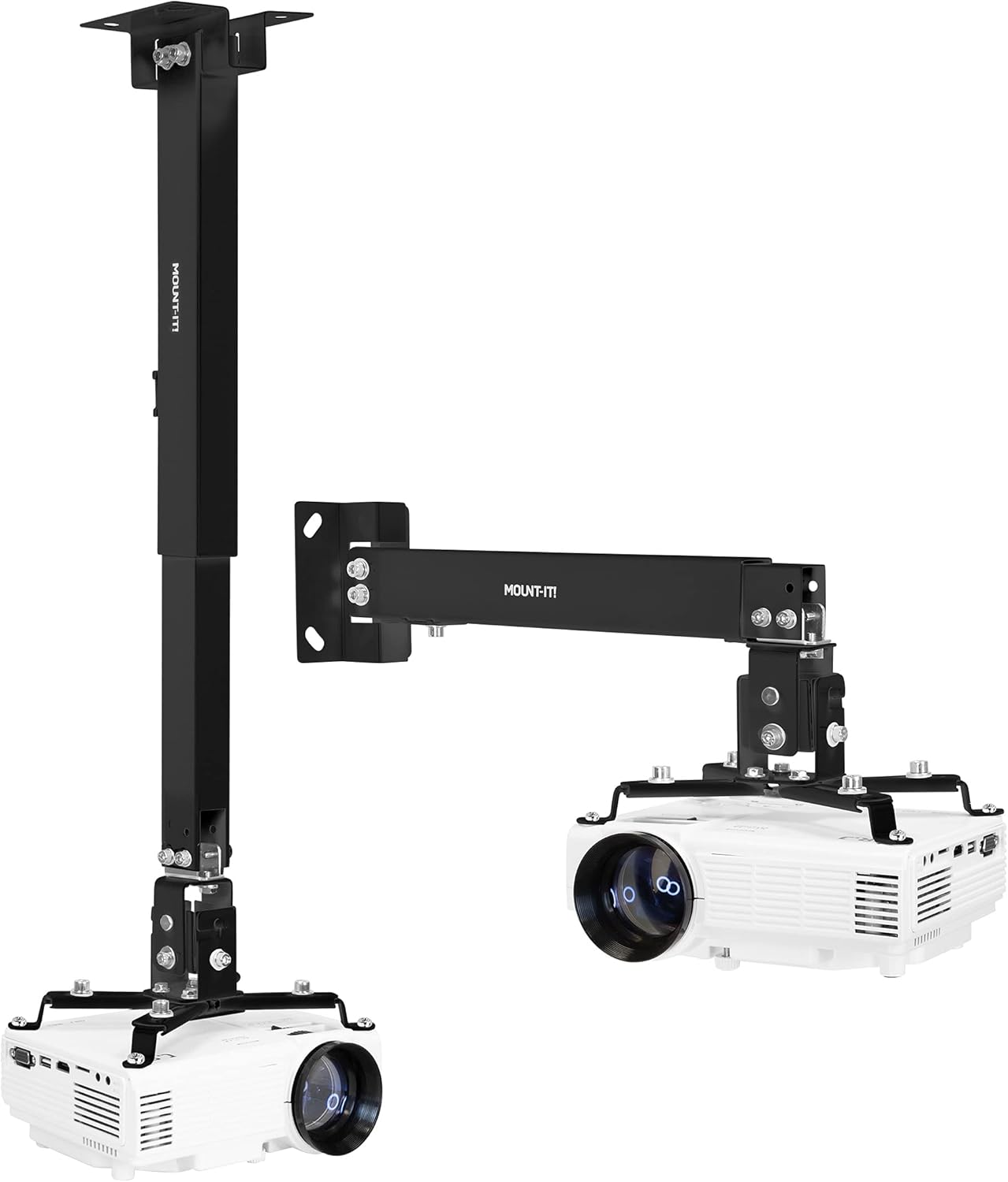 Mount-It! Adjustable Arm Mount |
6.9/10 | Check Price |
The Picks in Detail
Peerless-AV PRG-UNV
Why it made the list: The PRG-UNV uses geared adjustment knobs for tilt and roll, so you can fine-tune the image and the mount holds its position even during projector maintenance. Its universal “Spider” adapter fits most projectors up to 50 lb.
Key specs: 50 lb (22 kg) load capacity; tilt ±20 degrees; roll ±10 degrees; swivel 360 degrees on an extension column or ±15 degrees flush to the ceiling; geared adjustment knobs; security screws (Peerless-AV specifications).
Skip it if: Your projector weighs more than about half of 50 lb. Choose a mount with more headroom.
Pros
- Precise geared tilt and roll adjustment.
- Holds alignment during projector service.
- Security screws to lock settings.
Cons
- Extension columns for drop ceilings or high ceilings are sold separately.
- Limited swivel when mounted flush.
- Peerless lists a lower system rating when bundled with a short throw kit.
Chief RPAU
Why it made the list: The RPAU is a widely used professional universal mount, UL Listed, with 360-degree yaw and published adjustment ranges. Chief’s installation guidance is detailed, which helps installers plan the supporting structure correctly.
Key specs: 50 lb (22.7 kg) capacity; roll ±4 degrees; pitch 25 degrees; yaw 360 degrees; UL Listed (Chief specifications); Chief’s manual specifies that the structure support five times the combined load.
Skip it if: You want simple tool-free fine-tuning. The Peerless PRG-UNV’s geared knobs are easier.
Pros
- UL Listed professional mount.
- Full 360-degree yaw.
- Clear installation guidance.
Cons
- Smaller roll range than the Peerless.
- Ceiling plates and columns may be sold separately.
- Higher price than consumer mounts.
Mount-It! PRO 77 lb Mount
Why it made the list: The Mount-It! PRO mount has the highest weight rating in this guide and an adjustable extension, which suits heavier home theater and installation projectors and higher ceilings.
Key specs: 77 lb capacity; adjustable extension of about 23.8 to 35.6 inches (Mount-It listing).
Skip it if: Your projector is small and light. A compact mount like the Peerless is tidier.
Pros
- Highest weight rating here.
- Adjustable drop length.
- Commercial-style construction.
Cons
- Mount-It’s site lists several similar 77 lb models with different dimensions, so confirm the exact SKU.
- Specifications come mainly from the retail listing.
- Bulkier than a flush mount.
Mount-It! Adjustable Arm Mount
Why it made the list: This Mount-It! mount works on a ceiling or a wall, with wide tilt and roll ranges and full swivel, at a low price. It suits small home projectors and portable models.
Key specs: 33 lb capacity per Mount-It’s specification table (its product description cites a higher figure); tilt and roll of ±30 degrees; 360-degree swivel; ceiling or wall mounting.
Skip it if: Your projector is near 33 lb. Choose the Peerless, Chief, or Mount-It! PRO.
Pros
- Lowest price tier in this guide.
- Ceiling or wall installation.
- Wide adjustment range.
Cons
- Mount-It lists two different weight capacities; we use the lower one.
- No geared fine adjustment.
- Lightest duty pick here.
Projector Mounts Compared
| Mount | Weight capacity | Tilt or pitch | Roll | Swivel | Certification |
|---|---|---|---|---|---|
| Peerless-AV PRG-UNV | 50 lb | ±20 degrees | ±10 degrees | 360 (column), ±15 (flush) | Not stated |
| Chief RPAU | 50 lb | 25 degrees | ±4 degrees | 360 degrees | UL Listed |
| Mount-It! PRO | 77 lb | Not stated | Not stated | Not stated | Not stated |
| Mount-It! adjustable arm | 33 lb (spec table) | ±30 degrees | ±30 degrees | 360 degrees | Not stated |
How We Picked
We compared universal projector ceiling mounts from established brands on load rating, adjustment ranges, how adjustments lock, certification, and installation guidance. Where a maker’s pages list conflicting capacities, we use the lower figure. Every pick was assessed from manufacturer documentation, not our own measurements, and rated with the PJC Score.
How to Choose a Projector Ceiling Mount
Weigh your projector
Check your projector’s weight in its manual and pick a mount rated well above it. Remember cables and any accessories attached to the mount.
Check the hole pattern
Universal mounts use adjustable arms to match the mounting holes on the underside of most projectors. Confirm the arm reach fits your model.
Plan the drop length
High or sloped ceilings need an extension column so the lens lines up with the screen. Your projector’s throw chart and lens shift range decide the ideal height.
Fine adjustment and locking
Geared or knob adjustment makes it easier to square the image. Locking screws keep alignment when the projector is serviced or bumped.
FAQ
Can I mount a projector to drywall?
Not to drywall alone. Attach the mount to ceiling joists or use the anchors and structure the mount maker specifies.
Do I need to flip the image when ceiling mounting?
Yes. Most projectors have a ceiling or rear-ceiling projection setting that flips the image.
Will a universal mount fit my projector?
Most home projectors fit, but very small portable projectors may use a single tripod screw instead of a hole pattern.
Final Thoughts
The Peerless-AV PRG-UNV is our top ceiling mount for its geared adjustment and solid rating. The Chief RPAU suits permanent professional installs, the Mount-It! PRO handles heavy projectors, and the Mount-It! adjustable arm mount is the budget pick for light projectors.
About the author
Brandon Russell writes projector reviews and buying guides for ProjectorChannel. He compares projectors, screens, and accessories using manufacturer specifications and documentation, and focuses on the trade-offs that matter in a real room.