Best Speakers for Projector: 4 Picks by Connection Type
Most projector speakers are small, and they sit next to you instead of near the screen. Adding a soundbar or...
 By Brandon Russell
Updated November 24, 2026
Most projector speakers are small, and they sit next to you instead of near the screen. Adding a soundbar or speaker is the single easiest upgrade to a projector setup, but the right choice depends less on the speaker than on your projector’s audio outputs: HDMI eARC or ARC, optical, a 3.5 mm jack, or Bluetooth.
We compared soundbars and speakers from established brands using manufacturer specifications, with a focus on how each connects to a projector, and rated each with the same five weighted criteria, adapted for audio.
Safety note: route speaker and power cables where people will not trip over them, especially in dark home theaters, and follow the manufacturer’s placement instructions.
Our Top Picks
| Best for | Product | PJC Score About PJC ScorePJC Score (out of 10) is our editorial rating from five weighted criteria, based on manufacturer specifications. See how we score. | |
|---|---|---|---|
| Best overall |
 Sonos Beam (Gen 2) |
8.0/10 | Check Price |
| Best value soundbar |
 Yamaha SR-B20A |
7.5/10 | Check Price |
| Easiest setup |
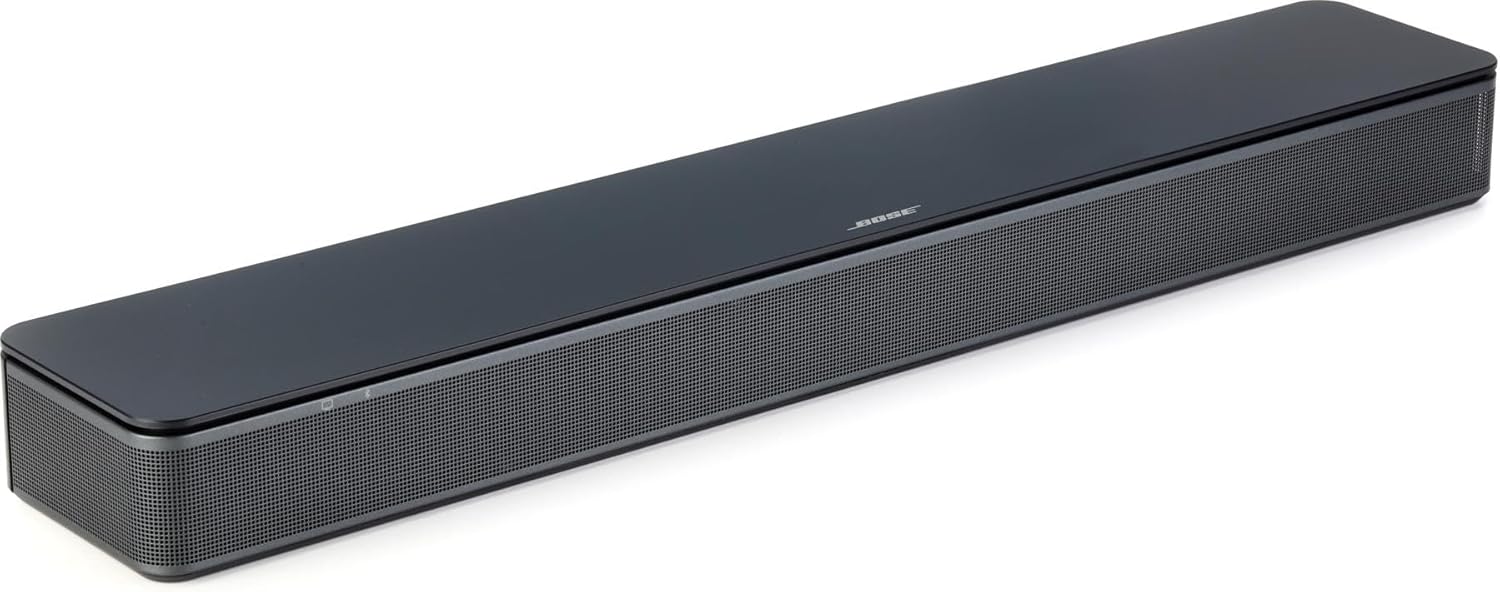 Bose TV Speaker |
7.4/10 | Check Price |
| Best for portable projectors |
 JBL Charge 5 |
7.2/10 | Check Price |
The Picks in Detail
Sonos Beam (Gen 2)
Why it made the list: The Beam (Gen 2) supports Dolby Atmos over HDMI eARC or ARC and includes an optical adapter for projectors without HDMI audio output. It can grow into a surround system with Sonos subwoofers and rear speakers.
Key specs: HDMI eARC/ARC connection; optical adapter included; Dolby Atmos via Dolby Digital Plus or Dolby TrueHD over HDMI ARC or eARC only; five Class-D amplifiers; Wi-Fi and Ethernet; about 25.6 x 3.9 x 2.7 inches (Sonos specifications).
Skip it if: Your projector only has Bluetooth or a 3.5 mm output. The Bose TV Speaker has an AUX input.
Pros
- Dolby Atmos support when connected over HDMI.
- Optical adapter included for older projectors.
- Expandable with Sonos subwoofer and rear speakers.
Cons
- Over optical, Sonos says you lose CEC and voice control, and Atmos is not available.
- No Bluetooth input listed for connecting a projector.
- Highest price tier here.
Yamaha SR-B20A
Why it made the list: The SR-B20A has built-in subwoofers, two optical inputs, an HDMI ARC connection, and Bluetooth, which covers most projector setups. It adds DTS Virtual:X and a subwoofer output for later expansion.
Key specs: HDMI output with ARC; two optical inputs; subwoofer output; Bluetooth 5.0; dual 3-inch built-in subwoofers; DTS Virtual:X; Dolby Digital and DTS 5.1 decoding; 120 W total (Yamaha specifications).
Skip it if: You want Atmos and expansion into a full system. The Sonos Beam (Gen 2) offers both.
Pros
- Built-in subwoofers for fuller bass.
- Many connection options.
- Strong value.
Cons
- No Dolby Atmos.
- Yamaha’s US spec table and manual describe ARC support differently; the manual lists HDMI OUT with ARC.
- No HDMI inputs for passing video through.
Bose TV Speaker
Why it made the list: The Bose TV Speaker connects over HDMI ARC, optical, or a simple AUX cable, which makes it one of the easiest soundbars to add to projectors that only have a 3.5 mm output. It is compact enough to sit near the screen.
Key specs: HDMI ARC, optical, and AUX inputs; Bluetooth 4.2; optional wired bass module (Bose specifications). Bose recommends not connecting it to a TV by Bluetooth.
Skip it if: You want room-filling bass. The Yamaha SR-B20A has built-in subwoofers.
Pros
- AUX input works with nearly any projector.
- Compact design.
- HDMI ARC lets a compatible remote control volume.
Cons
- No Dolby Atmos.
- Bass is limited without the optional bass module.
- A newer 2nd Gen model has different inputs; check which you are buying.
JBL Charge 5
Why it made the list: Portable and battery projectors often have only Bluetooth audio out. The Charge 5 pairs over Bluetooth, runs for many hours on battery, and is rated IP67, so it can sit on the grass next to an outdoor screen.
Key specs: Bluetooth 5.1; up to 20 hours of music playback; IP67 water and dust resistance; 40 W output; about 4 hours to charge (JBL specifications).
Skip it if: Your projector has HDMI eARC and stays indoors. A soundbar is a better match.
Pros
- Battery powered and waterproof.
- Long rated playtime.
- Works with any Bluetooth projector.
Cons
- Bluetooth can add audio delay with some projectors; check for an audio sync setting.
- A single speaker, not a soundbar.
- No wired HDMI or optical input.
Projector Speakers Compared
| Speaker | HDMI | Optical | Analog (3.5 mm) | Bluetooth | Dolby Atmos |
|---|---|---|---|---|---|
| Sonos Beam (Gen 2) | eARC/ARC | Via included adapter | Not stated | Not stated | Yes (HDMI only) |
| Yamaha SR-B20A | ARC | 2 inputs | Not stated | 5.0 | No |
| Bose TV Speaker | ARC | Yes | AUX in | 4.2 | No |
| JBL Charge 5 | No | No | Not stated | 5.1 | No |
How We Picked
We compared soundbars and speakers from established brands on the connections projectors commonly provide, audio format support, and setup. Every pick was assessed from manufacturer documentation, not our own measurements, and rated with the PJC Score.
How to Choose Speakers for a Projector
Start with your projector’s audio outputs
Check whether your projector has HDMI eARC or ARC, optical, a 3.5 mm output, or only Bluetooth. That decides which speakers will work and which audio formats you can get.
HDMI eARC for the best sound
eARC carries the most audio formats, including Dolby Atmos, and lets one remote control volume. Several projectors in our home theater projector guides include eARC.
Or connect the source directly
If your projector lacks a good audio output, connect your streaming box or console to the soundbar first, then pass video to the projector, or use a separate audio extractor.
Bluetooth for portable setups
Bluetooth is convenient outdoors but can add delay. Look for an audio sync adjustment on the projector.
FAQ
Can I connect a soundbar to a projector?
Yes, through HDMI eARC/ARC, optical, analog, or Bluetooth, depending on the outputs your projector has.
Why is my projector audio out of sync?
Wireless connections and processing can add delay. Use a wired connection if possible, or adjust audio sync in the projector or speaker settings.
Do I need a subwoofer?
Not necessarily, but it adds impact to movies. The Yamaha SR-B20A has built-in subwoofers, and the Sonos Beam (Gen 2) can add one.
Final Thoughts
The Sonos Beam (Gen 2) is our top projector speaker for HDMI eARC setups and Dolby Atmos. The Yamaha SR-B20A is the value soundbar, the Bose TV Speaker is the easiest to connect, and the JBL Charge 5 pairs best with portable and outdoor projectors.
About the author
Brandon Russell writes projector reviews and buying guides for ProjectorChannel. He compares projectors, screens, and accessories using manufacturer specifications and documentation, and focuses on the trade-offs that matter in a real room.